HTMLでテーブルは学びましたね。
今回はHTMLとCSSでテーブルを完成させてみましょう!
あわせて読みたい


tableタグについて理解しよう!
テーブルの結合について 複数のセルをつなげて1つのセルにすることもできます。重複する項目があるときに便利です。 今回書いたコード <style> th, td { border: ...
記事の内容
【チャレンジ】テーブルレイアウトを組んでみよう!
 トリペン先生
以下のテーブルをHTML / CSSで完成させてみましょう!
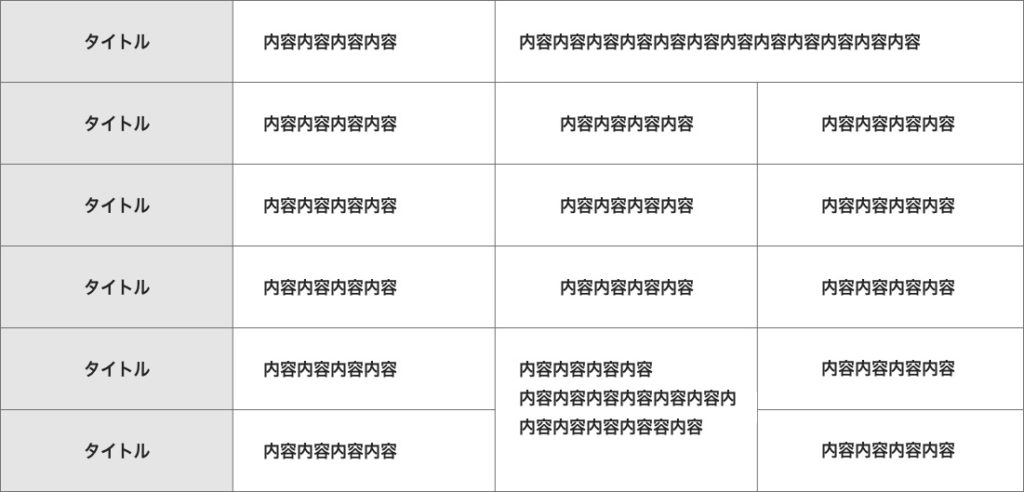
参考コード
<div class="wrapper">
    <table class="table_style">
      <tr>
        <th>タイトル</th>
        <td>内容が入ります</td>
        <td colspan="2">内容が入ります内容が入ります</td>
      </tr>

      <tr>
        <th>タイトル</th>
        <td>内容が入ります</td>
        <td>内容が入ります</td>
        <td>内容が入ります</td>
      </tr>

      <tr>
        <th>タイトル</th>
        <td>内容が入ります</td>
        <td>内容が入ります</td>
        <td>内容が入ります</td>
      </tr>

      <tr>
        <th>タイトル</th>
        <td>内容が入ります</td>
        <td>内容が入ります</td>
        <td>内容が入ります</td>
      </tr>

      <tr>
        <th>タイトル</th>
        <td>内容が入ります</td>
        <td rowspan="2">内容が入ります内容が入ります<br>内容が入ります内容が入ります</td>
        <td>内容が入ります</td>
      </tr>

      <tr>
        <th>タイトル</th>
        <td>内容が入ります</td>
        <td>内容が入ります</td>
      </tr>
    </table>
  </div>
.wrapper{
max-width:1200px;
margin:200px auto;
}
.table_style th,.table_style td{
padding:10px 30px;
border:1px solid #444;
}
.table_style th{
background-color:#ccc;
}講座を完了したらクリックしてね!